
Launching an iOS and Android App: The Work Beyond Uploading a Binary
Finished application code can still be blocked by developer enrollment, signing, store assets, reviewer access, or third-party configuration. Useful launch support makes these dependencies explicit, assigns ownership, and defines evidence for completion.
This article organizes my existing application-onboarding and store-submission notes into a reusable delivery method, checked against current official guidance. Those records do not establish a consolidated launch count, approval rate, or complete review-outcome history, so none is claimed.
Establish ownership and access before building
Determine whether the app belongs to an individual or organization and who completes verification, agreements, and payment. Organization enrollment involves legal-entity and authorization requirements, including applicable D-U-N-S information. Apple enrollment requirements.
Use member invitations and permissions appropriate to the task. Store administration, CI identities, and signing materials are separate concerns. Creating an app, uploading, submitting, and releasing can require different access. Secrets belong in controlled credential storage; handoff documents describe their purpose and location.
Historical templates also need correction. Google Play currently charges a US$25 one-time registration fee. Applicable new personal accounts must complete a closed test with at least 12 continuously opted-in testers for 14 days before applying for production access; meeting that condition still requires the access review. Registration, testing requirements.
Align application identity across services
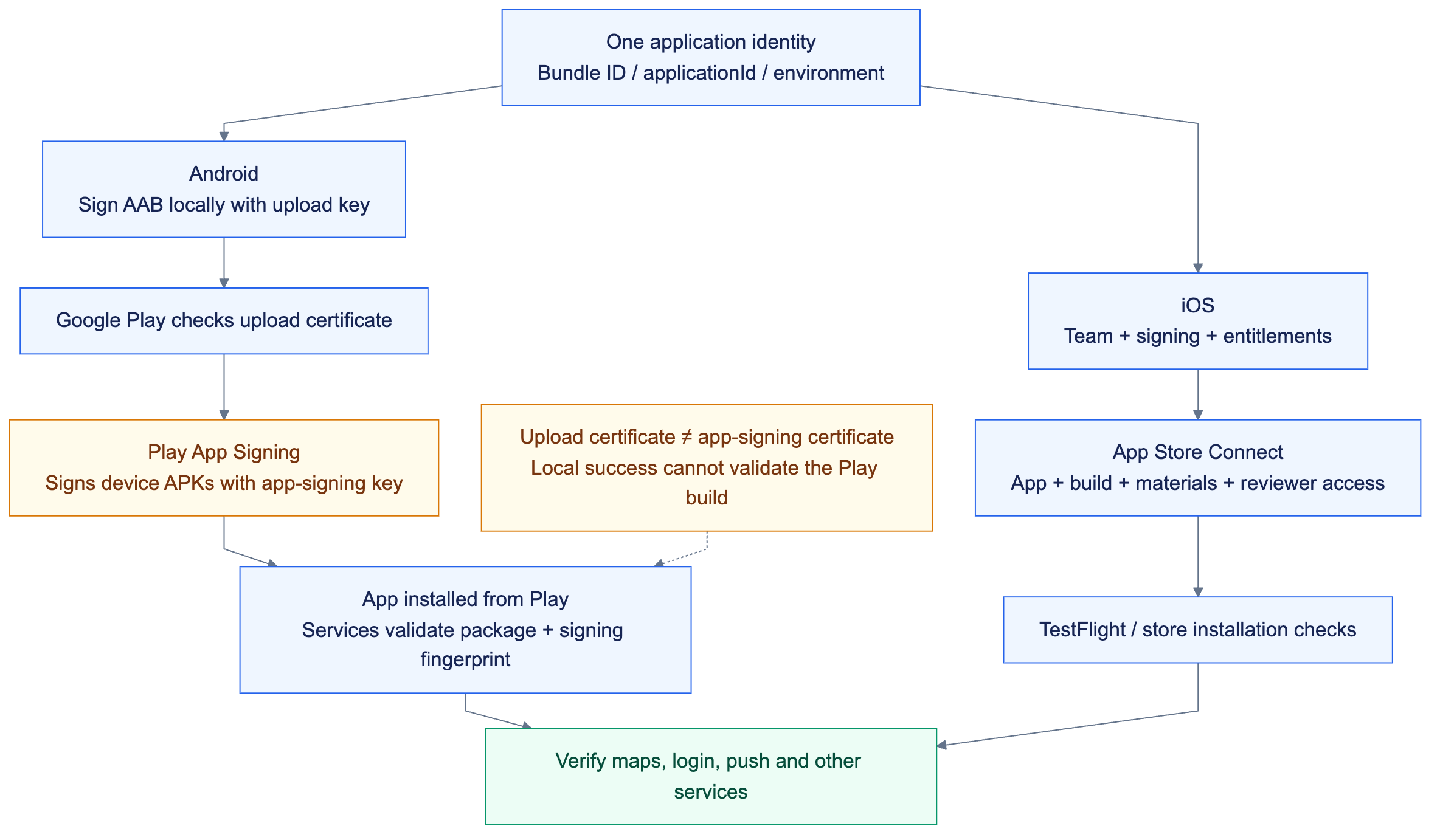
Technical flow; implementation and validation boundaries are explained below.
| Area | Values that must agree |
|---|---|
| iOS | Team, Bundle ID, store record, signing, entitlements |
| Android | Application ID, Play app, upload certificate, app-signing certificate |
| Third-party services | Environment-specific Firebase, push, maps, login, and payment configuration |
| Version | Store version, build identifier, source commit, binary |
My Android onboarding records connect package identity and certificate fingerprints to service configuration and a notification check after installation from Google Play.
The upload key and Play App Signing key are different roles. Services restricted by certificate fingerprint must recognize the certificate used for the distributed application. Push, maps, and sign-in need independent checks; one notification does not validate all integrations. Android app signing.
Tie store materials to the submitted build
An identity manifest and artifact inspection
I organize application identity and signing references into a reviewable handoff. The generic JSON below is a design example, not a store API payload or an existing platform schema. It contains references rather than private keys, reviewer passwords or service credentials. Capabilities must match the actual app.
{
  "app": "example-mobile",
  "environment": "production",
  "ios": {
    "bundleId": "com.example.mobile",
    "distribution": "app-store",
    "teamIdReference": "signing/ios/team",
    "capabilities": ["push-notifications", "associated-domains"]
  },
  "android": {
    "applicationId": "com.example.mobile",
    "track": "internal",
    "uploadCertificateReference": "signing/android/upload-certificate",
    "appSigningCertificateReference": "signing/android/play-app-signing-certificate"
  },
  "servicesToVerifyFromStore": ["maps", "login", "push"]
}
Next, inspect the binary instead of relying only on configuration. These read-only IPA checks require macOS developer tools and an exported Example.ipa. They were not run against an app during this writing task.
# macOS; an IPA already exported for inspection. No upload or signing occurs.
# Use a fresh temporary directory to avoid mixing builds.
inspection_dir="$(mktemp -d)"
unzip -q ./Example.ipa -d "$inspection_dir"
find "$inspection_dir/Payload" -maxdepth 1 -name '*.app' -print
# Replace Example.app below with the actual application bundle name.
plutil -extract CFBundleIdentifier raw "$inspection_dir/Payload/Example.app/Info.plist"
plutil -extract CFBundleVersion raw "$inspection_dir/Payload/Example.app/Info.plist"
codesign -d --entitlements :- "$inspection_dir/Payload/Example.app"
Compare CFBundleIdentifier, CFBundleVersion, and the signed entitlements' application identifier, Team, push environment and associated domains, then check that the store selects this build. On Android, confirm the app-signing certificate in Play's App integrity page and compare package names and fingerprints registered with maps or login services. Play App Signing can use a different key from the upload key, a useful starting point for a local-build success followed by a store-build failure. Android app signing.
The handoff includes the app name, icon, localization, description, classification or keywords, screenshots, support URL, privacy policy, review contact, and access notes. Screenshot requirements should be checked in the current Console, and images should represent actual submitted functionality.
iOS submission selects a specific build and requires completed metadata. Google Play setup covers applicable access, advertising, rating, audience, and Data safety declarations. Apple submission guidance.
Reuse a form's structure, not another application's answers. Statements about advertising, audience, and collected data must reflect the actual product and SDKs.
Make the core experience accessible to reviewers
My operational notes cover review accounts, access instructions, and handling test data afterward. A reusable review-access package includes a dedicated account, stable access, clear English instructions, suitable demonstration data, and accurate explanations of limitations.
Credentials belong in the designated store fields, not public documents. Arrange testing that avoids real charges or irreversible business actions. Reviewers should not depend on a developer being online to relay an OTP or reveal an unexplained hidden switch.
A demonstration video can provide context but does not replace functionality in the submitted build. Payment testing also depends on the purchase type: third-party payment integration is not evidence of StoreKit subscription experience.
Derive privacy declarations from actual behavior
Map features and SDKs to data types, purposes, recipients, and deletion behavior before completing disclosures. Both stores require consideration of third-party data practices. Apple privacy details, Google Data safety.
The policy URL, deletion entry point, and implemented behavior must agree. An ordinary privacy-policy page does not establish an account-deletion capability.
Separate first launch from an update
Initial publication includes account and application setup that an established app has already completed. Google explicitly states that Managed publishing cannot be used for an application's first publication, so an update-control plan cannot automatically promise the same launch timing. Google publishing controls.
Track actual milestones: buildable, uploaded, testable, submitted, rejected, approved, published, and available in the intended region. Each needs different evidence.
For a rejection, I would map each finding to code, configuration, metadata, or reviewer access, document corrections, and identify the resubmitted version. Engineering support can deliver diagnosis, changes, and a clear response; the store makes the review decision. Responding to Apple review messages.
Leave a repeatable handoff
Delivery includes ownership, the application identity map, store materials, build identifiers, installation checks, review correspondence, and instructions for the next update. Together with a build-and-upload pipeline, the initial setup becomes reusable operational knowledge.
This article uses three historical onboarding and submission documents plus current official guidance. No store publication or verification of historical review accounts was performed during writing.
ivan provides part-time remote support for iOS / Android onboarding, launch preparation, and release troubleshooting through written, asynchronous collaboration.