
Why Taps Stopped Working After Scrolling: Tracing iOS Events into React Native Pressability
During a React Native New Architecture adaptation, I investigated a problem on an iPhone X running iOS 16.7.10. After scrolling a particular form, a visible TouchableOpacity button showed press feedback, but its onPress callback did not run.
The investigation connected touch coordinates, post-scroll measurement, and Pressability state transitions. The delivered page-level workaround wrapped the affected ScrollView in a View, supported by a record of the Native-to-JS investigation.
The code change was small. Explaining where the interaction lost its eligibility as a press was the harder part.
Distinguish a received touch from a completed press
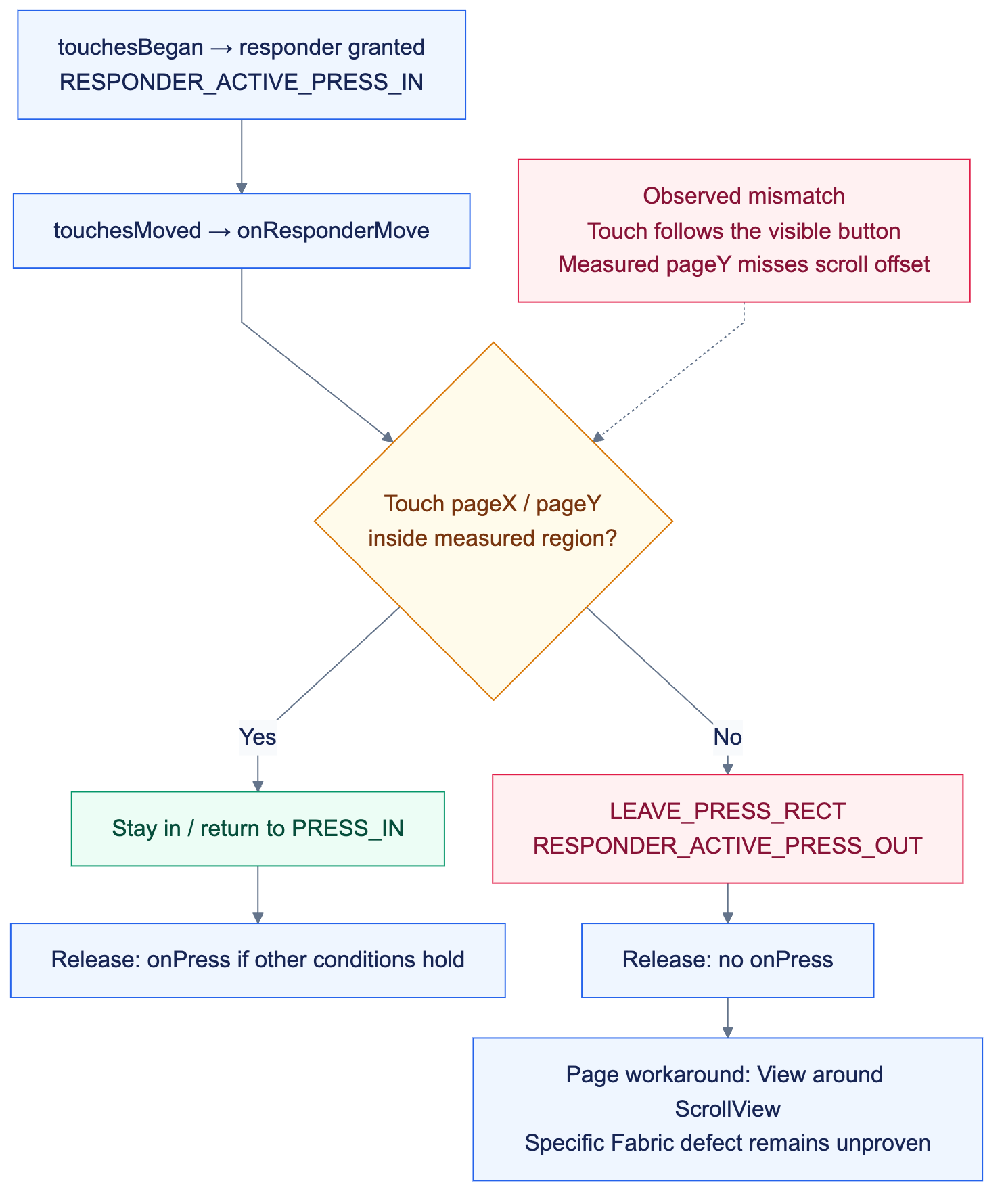
Technical flow; implementation and validation boundaries are explained below.
I compared native callbacks, JS responder callbacks, and the final business callback. In the recorded failing interaction, the device emitted touchesMoved, reaching the region check in onResponderMove. The normal comparison taps recorded only the beginning and end callbacks.
This does not establish a hardware defect or behavior shared by every iPhone X. It identifies the branch that needs investigation.
The diagram shows the failure path for the already activated touch.
This diagram omits other paths such as delays, long presses, and cancellation. Receiving onPressIn establishes that the touch entered the response chain; it does not guarantee eligibility at release.
Connect the transition to coordinate evidence
Turn the coordinate mismatch into a checkable predicate
Synthetic numbers below reproduce a visible hit that fails the region test. These are not device logs. The model isolates coordinate space and omits hitSlop, pressRetentionOffset, delays and long-press branches.
function insideRegion(touch, region) {
  return touch.pageX > region.left && touch.pageX < region.right
    && touch.pageY > region.top && touch.pageY < region.bottom;
}

const touch = { pageX: 80, pageY: 120 };
const measured = { left: 20, right: 180, top: 820, bottom: 864 };
const visible = { left: 20, right: 180, top: 100, bottom: 144 };

console.log(insideRegion(touch, measured)); // false
console.log(insideRegion(touch, visible));  // true
Only the region's vertical position changes; the touch stays identical. In an investigation, capture touch.pageY, measured pageY/height, scroll offset and state transitions within the same gesture. Do not combine observations from different layout moments. A useful counterexample is a deliberate drag outside the visible region: it must still return false, preserving normal cancellation.
Pressability checks the touch against a responder region during movement and sends LEAVE_PRESS_RECT when it falls outside. Release handling also depends on the previous state and other conditions. I examined measurement, movement, and release together. RN 0.77.3 Pressability source reference.
The investigation compared touch and measurement values between architectures. In the failing case, the measured pageY used to build the region did not reflect the ScrollView's scroll offset. The touch was still near the button's visible position, so the two could not be compared correctly.
This explanatory model is not a device log or a general coordinate-conversion formula:
Button position within scrolling content: Y_content
Scroll offset: offset
Visible position: Y_visible ≈ Y_content - offset (parent offsets omitted)

The touch is near Y_visible
The incorrect measurement remains near Y_content
  → A visually valid tap is classified as leaving the press region
The measurement callback constructs the region from page coordinates and size. The region check then uses the touch's pageX / pageY. Logging only a local coordinate such as locationY, or only the missing business callback, would not explain that mismatch.
The evidence identifies inconsistent measurement and the resulting state transition. It does not identify the exact Fabric layout or measurement function responsible for omitting the offset. Those are different levels of diagnosis.
Apply a local page workaround
The adaptation record resolves the affected page by adding a container outside the ScrollView. This rewritten example uses generic names:
import type { PropsWithChildren } from 'react';
import { ScrollView, View } from 'react-native';

export function FormScreen({ children }: PropsWithChildren) {
  return (
    <View style={{ flex: 1 }}>
      <ScrollView style={{ flex: 1 }}>{children}</ScrollView>
    </View>
  );
}
This was the documented page-level workaround. It was not a framework fix with a proven lower-level cause that could be applied universally.
Increasing hitSlop changes the allowed region without correcting its coordinate source. Ignoring all movement events would alter the intended cancellation when a user drags off a button. Neither is an equivalent replacement for understanding the observed failure.
Resolving the page issue and fully explaining the underlying framework mechanism can have different completion scopes. The useful deliverable preserves the failure evidence and makes the intervention's scope explicit.
Make verification distinguish success from a lucky tap
The historical notes contain the device and OS, callback differences, coordinate comparisons, state transitions, and workaround. They do not contain a complete post-fix device matrix or execution count. This writing session did not rerun the scenario, so no pass rate or all-device success claim is made.
A follow-up verification should cover:
| Scenario | What to observe |
|---|---|
| Taps before scrolling, after scrolling, and after returning to the top | Whether the measured region follows the visible button |
| Slight movement between press and release | Whether the interaction incorrectly leaves the region |
| Deliberately dragging outside before release | Whether normal cancellation still works |
| Keyboard changes and screen re-entry | Whether coordinates remain correct after layout changes |
| The original device and comparison devices | Whether the observed device difference persists |
Evidence should include both touch state and the business result. For a submit button, verify the intended post-submit state; an animation or onPressIn alone does not complete the user task.
What the investigation demonstrates
The work narrowed a seemingly unresponsive button through native callbacks, RN event handling, Pressability state, and business callbacks. Coordinate evidence explained the failure path and supported a local intervention.
For remote support, that investigation is also a maintainable handoff: another engineer receives observation points, decision criteria, and a verification path without needing to rediscover the entire native event system.
ivan provides part-time remote React Native / iOS support, focusing on native interactions, difficult debugging cases, and delivery through written, asynchronous collaboration.